
The Menu Planner to Rule Them All

Since moving to Florida this summer, Mark and I have taken the initiative to create a bit more structure in our lives…from the food inside our cabinets, to our exercising, and now…to our meals!
Menu planning is one thing we both agreed would not only make our lives easier, but so much healthier. We’ve never done it before (chalking it up to busyness), but we’ve gotten into that chips-and-queso-for-dinner scenario one too many times of late…. It was time to make a change.
Enter, the menu planner to rule them all!
I cannot take ANY credit for coming up with this genius design. All I did was create a replica of the original created by the oh-so-brilliant Clair Dickson (sadly no longer online).
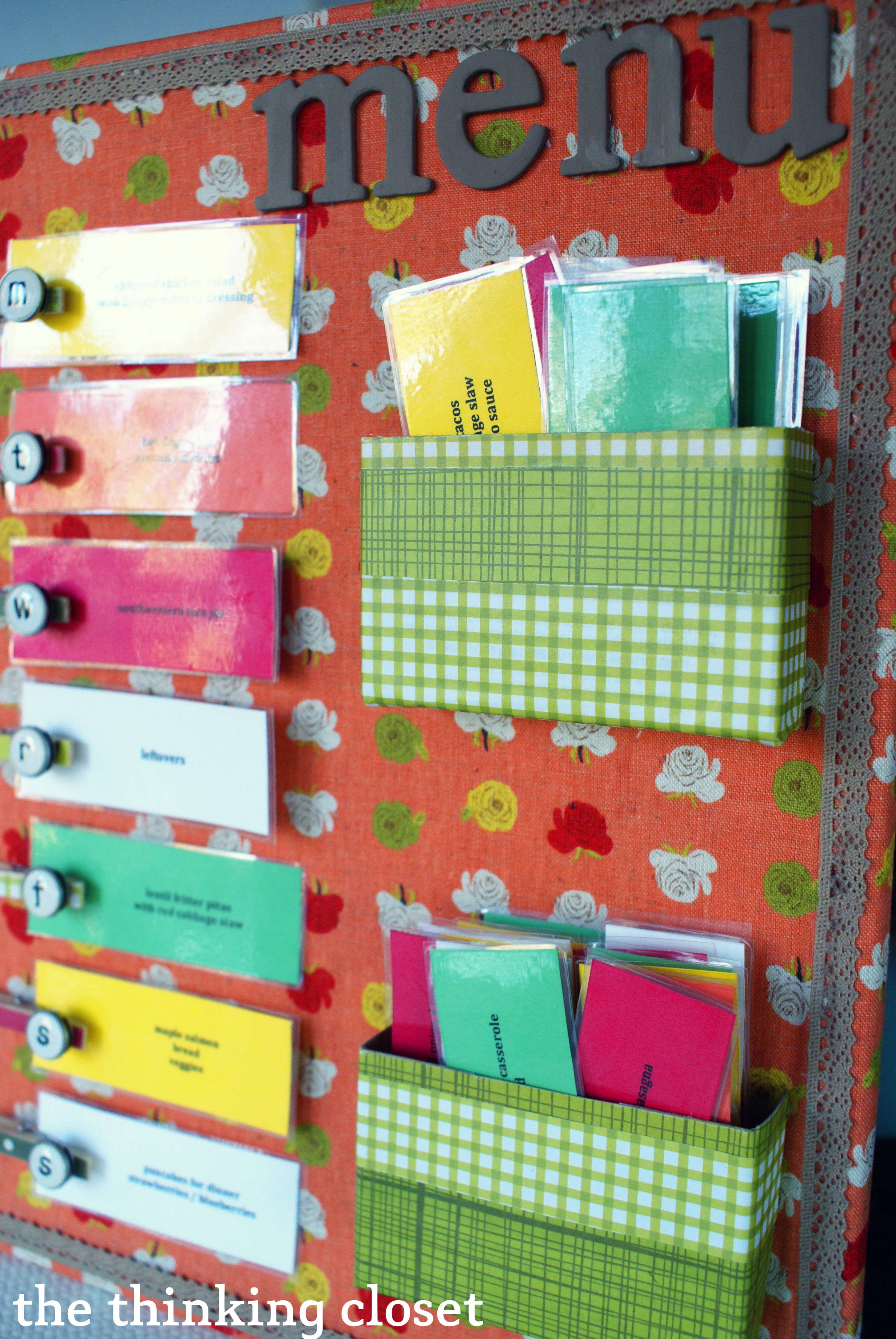
Now, you may be wondering a few things.
What supplies did you use?
- Rows of Roses Fabric from Banberry Place.
- 11″ x 14″ Magnetic Whiteboard – $8.99 at Hobby Lobby.
- Scrapbook paper (picked up a book of it on sale at Hobby Lobby for $10 that should last me for the rest of my life).
- Ribbon – 50 cents for a foot.
- Medium-sized clothespins.
- Type-Letter Embellishments – $4.95 at Hobby Lobby.
- Keurig K-Cup box from the recycle bin – one box to create both mini boxes on my board.
- Chipboard letters I already had on hand from my White Letters on White Canvas D.I.Y. Artwork.
- Cardstock from Staples. $11.99 for a pack of 250 sheets of cardstock in green, yellow, red, orange, and hot pink…should last me for quite a few craft projects.
- Fabric & Paper Glue by Elmer’s.
- Other supplies: Acrylic paint, hot glue, x-acto knife, scissors, clear packing tape.
How long did it take you to make this?
Good question (smile). I worked on it bit by bit over a week, but if you added it all up, it took about 8 hours. I procrastinated from typing up the menu cards for several days (and several episodes of Downton Abbey), since I knew that would take the most time and attention to detail. However, when I think about the hours of time this menu planner will save us in the end (no more staring blankly into the fridge), it is worth every second of time invested into creating it.
Why is THIS the menu planner to rule them all?
I am fully aware of the subjectivity of that statement, but below, I’ve listed my reasons why I think it’s going to rule in our household.

- The design is simple, covering dinners for one week. We take new recipes from the top box and after they’re used, deposit them in the bottom box (which discourages repeats). Then, once the top box is empty, we refill it with the cards from the bottom box and start all over again.
- It encourages variety because of the color-coded cards (see key below).
- With this system, it will be easy to write up my grocery list on Sunday nights. All I do is look at the back of each menu card I have selected for that week to find my ingredients (see second image below).
- When it comes time to referring to my recipe, I know where to look based on the “location” or page number I have listed on the card.
- It pulls all of our favorite recipes into one place, so they’re right at my fingertips instead of buried in a cookbook.
- The board is magnetic. So, it lives on the fridge, but is easy to remove when I want to sit on the couch and arrange meals for the week and enter ingredients on our Cozi grocery list.


Do you have any tips for me if I were to make my own?
Here’s what I learned in the process:
- Cut your boxes to size before covering them with paper.
- When typing up your menu cards, use Microsoft Excel to create your boxes. If you’re using an older version of Microsoft Office (2004), you’ll want to create your boxes in Excel, but then copy and paste them over into Word, which will allow you more formatting options for your text.
- Also, when typing up your menu cards, change the color of your box outlines to a very pale gray; they’ll serve as sight-lines when it comes time to cut the cards out.
- Make sure you’re aware of the direction in which your printer prints your text so you properly set your cardstock when printing on both sides.
- 4 foot roll of ribbon will barely fit around the margins of a 11″ x 14″ board. So, buy a little extra.
- Only lay down 4 or 5 cards on a strip of packing tape at a time. More than that gets a bit unwieldy.
Would you be willing to share A FREE PRINTABLE OF the file you used to create your menu cards?
I’m more than happy to share a free printable of the PDF I used to create my menu cards to help eliminate a step for you! Just click HERE to access. {Fine print: this design is for personal use only and is not to be used for commercial purposes. Thanks!}
Now, it’s YOUR turn:
Do you have a system for planning meals that works well for your family? If so, I’d love to hear about it. I know there are an abundance of other great ideas out there, and we can all learn from each other’s glory and gorey stories.
WHERE TO NEXT?
Here are some other posts that readers love:



I love this idea! Maybe when my partner and I move in together, I will use this to make a menu planner, but I am in the process right now of going to school for early childhood education. I will absolutely be using this to create a pictorial schedule. I am SUPER excited!
Oh yay! I’m so glad you found this project inspirational. Thanks for sharing your excitement!
Awesome idea! I love this and can’t wait to make my own. How did you cover the whiteboard with fabric? Also, did you laminate the recipe cards?
I just used a glue gun to secure it to the back (it’s not pretty, but it works!). And I just used clear packing tape to create the laminated effect since I didn’t have access to a laminator machine. Worked great!
Are you willing to share some of your menu ideas? I’m needing some fresh ideas!
I need fresh ideas, too! Lol. Lately, we’re trying to keep it simple and rotate through the same 5 meals or so each week (with a few nights for leftovers or improvising). Salmon with asparagus, taco salads, chicken and veggie stir fry, butternut squash soup, salad topped with grilled chicken and fruit…those are some of our go-tos. I’m definitely not a great cook (baking is more my game), so easy and quick is the name of the game for me. Let me know if you’ve found anything that fits those parameters! I’ll gladly take suggestions, Jennifer!
Loved this idea!! I made it and am going to link back to your blog, thank you for the great ideas!!
Hoping to make this soon. As a working mom I need something to keep me organized. I can see how this would also speed up the grocery shopping too!
Is anyone who completed the project willing to share their recipe file? I’m always looking for new recipes that are easy and kid friendly.
I have looked at this 30 times in the past 3 days. I am SO doing this. Really, I am. I do have one question: I’ve read through several times, but don’t see a link to an actual step-by-step “how-to” for this project. Maybe no one else needs this, I’m not the craftiest gal around. 🙂 But I do have some questions (and I’m sure I’ll have more once I dig in and get started)… Does the entire magnetic white board stick to the fridge on its own? Did you hot glue the fabric to it or use tape? Did you hot glue the clothes pins or adhere magnets to them and then stick them to the board? Is this board magnetic on both sides? Did you use packing tape rather than laminating? How did you get the Keurig 1/2 boxes to stay on the board? Maybe I just missed the link… Help please. 🙂
Hey Crystal! You’re right – – I didn’t do a true step-by-step in part because I based mine off of someone else’s, so I wanted to be sure to give my credit to her rather than take it as my own. However, I do plan on re-making mine with a few adaptations in the next year, so you should stay tuned for that! But in the meantime, I’ll do my best to take a stab at your questions: 1) yes, the board sticks to the fridge on its own. I did hot glue a few additional strong magnets to the back to help it out…but the ones that came with it were strong on their own. 2) I hot glued the fabric to the back of the board…then the magnets to the back overtop everything. It looks pretty ugly, ha ha, but it works! 3) Actually nothing on the board itself is magnetic…everything is glued. However, a reader did a magnetic version in my recent Reader Showcase which you could check out! Make it your own, for sure. 4) This was actually a white board so it wasn’t magnetic on both sides. 5) Yes, I used packing tape as my thrifty girl’s version of laminating! (wink.) 6) I just glued the Keurig boxes with a very fine line of hot glue mostly on the interior edge. I was worried it wouldn’t take, but it has lasted over 2 years! If you end up finding thinner boxes, you could leave the back on them and just glue the entire backside. That’d definitely create a stronger bond.
Hope that helps! Best of luck!
Thank you SO much for taking the time to thoughtfully answer my questions and respond to my comment. I’m really impressed since this post was from a couple years ago. (I realized that after I posted my comment and thought I’d email you directly if I didn’t hear back ~ so thanks!!) I’ve been compiling my recipes and want to start on this project soon. Thanks again for being such a nice and helpful person. Blessings for a wonderful day!
You’re so welcome, Crystal! Glad I could be of help. I’m not always able to stay on top of my comment responses, but I wanted to be sure to respond to your many questions because it just excites me to know someone else is taking on The Menu Planner to Rule Them All. You’ll have to keep me posted with how yours turns out. (Although I already know it will be fabulous.) Blessings back atcha, girl!
I made my version of The Menu Planner to Rule Them All! Check it out, if you’d like:
http://niftybetty.wordpress.com/2014/09/08/diy-magnetic-menu-board/
Hello there,
I posted this earlier but it seems to have disappeared! So I hope I’m not double posting. I am wondering if you have any suggestions for altering the menu cards to account for the fact that I do not always pair my entrees with the same sides. For example, sometimes I make pork chops with au gratin potatoes and corn and sometimes with couscous and cauliflour. Any ideas?
Thank you!
I’m in the process of moving my families recipes into Evernote. All entries can be given tags and are searchable. I can sync them to the cloud or keep it off line accessible and look up a recipie from anywhere. Plus it’s 100% searchable! Search the name or text for whatever you’re looking for. Tags can help sort them into categories (main ingredients, cuisine, time to fix, special occasion, holiday, etc).
Thanks! I did mine too! I would like to send you the pict!
Hi Lauren – just wanted to let you know I found your blog through a GoEpicurista.com comment and absolutely love it. As a pack-rat with a crafty inclination, I love the fact that your blog is not about everything being perfect. Like in the GoEpicurista post about Banning “Someday” from your Vocabulary, I think it also applies to that really cute project you’ve been thinking about starting… someday…
Now I’m going to open that nice bottle of dessert wine that has been sitting in my fridge – just because – and start on your adorable menu planner idea.
So happy to hear this, Fei! I’ve actually struggled with perfectionism my whole life, so I intentionally make choices toward imperfection in order to combat it! And I’m delighted to hear you might tackle the menu planner! If you care to share, I’d love to see a photo of it when you’re done! (thethinkingcloset {at} gmail {dot} com)
I love it! But I’m gonna try it writting some inspirational cuotes 🙂
Just a thought, if you type the cards in excel you could make two boxes beside each other. Type the name of the dish in the first box and whatever you wanted on the back in the box beside it. Then you could print them one sided cut the steps and just fold them over. since your taking over the whole thing it will stay folded and it would keep you from the frustration of trying to line up the front and back of the cards.
Lauren this post caught my eye because for the longest time I have wanted to get in the habit of planning my meals each week but never get around to it. This seems like a great system. The board itself is absolutely adorable. You have a great talent. I was wondering since it has been a little over a year that you started this if you had any new words of wisdom on how the system has worked for you? How often do you update your recipe cards? Have you been challenged sticking to it? this is one of my new year resolutions and I finally think I found something I can use. Thank you again for your inspiration!
I’m so glad you’re keen on the menu board! The system worked really well for many many months, and then one of the boxes came unstuck, so I took it down to mend it…and alas, the procrastinator in me still hasn’t gotten to fixing it! (So lame.) Even my hubby keeps saying, “When are we going to get our menu planner back?” Maybe it can be my Christmas gift to him! Lol.
If I were doing it again, I’d cut out more slips of cardstock to have at the ready to at least handwrite when we come across new recipes. And I think a reader suggested this in the comments, but I’d probably skip out on common ingredients that you always have (like salt, pepper, flour) and only highlight on the back the ingredients you might need to shop for. Otherwise, I really wouldn’t change a thing. It can take a while to type out all the recipes, but it’s worth it! For the first time in our lives, we’ve been planning meals…and it feels oh so good.
Hi Lauren! Love the idea, I think it is so much easier planning meals than figuring them out the day of. My boyfriend and I will be moving into our first apartment soon and I am definitely implementing this! I just had one question: how do you go about lunches? Do you make those separate than meals on the meal board? I would love to hear about how you plan all your meals!
Hi! I don’t know if its just me….but I’m having a terrible time trying to make the word doc? HELP!
So sorry, Tania! Did you download the free Word doc I created? Is that what is giving you trouble? If you give me more specifics, maybe I can help you out!
I just started a blog. Nothing fancy, just for me and my friends. I did put a link to your original post here on my menu planner. If you want to check it out and make sure it’s okay and not stepping on any toes (since I am super new at this) feel free. It’s jmfreee.blogspot.com.
-jFree
Thanks again for the invitation to check out your menu planner! Love all the ways you made it your own, Jess!
Lauren,
Near the beginning of the summer, I stumbled upon your blog. Where have you been all my life?! I smile every time I read a post. Not only are you a great writer, you always find a way to add humor, which I appreciate tremendously. On top of all that, you share wonderful ideas, and your directions are oh-so-easy to follow. Thank you for the diligence! I just finished my own menu planner and would love to share a picture with the expert. Would it be best to email you?
Fondly,
Emme
Okay, I SMILED as wide as the sky to read this comment, Emme. Thank you ever so much for taking the time to share. I’m glad to know my cheesy sense of humor isn’t lost on you and that my tutorials have been a help! Seriously, that’s a huge encouragement to me. I would absolutely LOVE to see the menu planner you created and feature it in my reader showcase at the end of the summer (if that’s cool with you). Yes, email is the best way to go! You can send it to thethinkingcloset {at} gmail.com. Thanks again, Emme, and all the best to you!
I love the board. My husband and I try to plan ahead, but I have a hard time getting him to chose anything outside of chicken fingers and pizza. Anyway, I was think that this project was from before you had your Silhouette, and I just wondered what, if anything, you’d do differently now that you have it. 🙂
I am so excited to make this menu planner. I’ve been using menu planning for over a year now and it has changed my life! But right now I just right it down on a post it and stick it on the fridge…BORING!! My question is if one yard of fabric would be enough to cover the board? Thanks bunches!
This is the nicest menu board I have ever seen! I want one of these!! Any chance you are selling them? Please let me know, I will be the first to buy 🙂
You are too kind Kathy! Never thought to sell them before! Will think on that and get back to you via email soon.
This is great….it will help me save money as well. We tend to go to the store and see “new” products that look good and when you get them home, they are not to your taste and sometimes no one else’s. This will make me stick to my menu and get rid of that expensive habit.. Thank You for the post
You know, I completely understand about that expensive habit because that was pretty much standard practice for us for our first three years of marriage. Sometimes I would scribble down a grocery list, but mostly it was haphazard grabbing of whatever looked good at the store. And oftentimes, without a plan in place for those ingredients we brought home, food would go unused and go bad. Now, it’s a rare occasion for a veggie or fruit to go bad and we pretty much stick to the list! It leads to happy bellies and happy credit card and happy fridge…happiness all around. 😉 Anyway, glad to know this may help you and your family, Janice! Best of luck to you all.
I just found my answer. It’s ok not to reply. I love your Menu Planner!
Glad you figured it out, Angie! (That the whiteboard has mounting hardware.) You’re the second person to ask about it, though, so I’m definitely going to go back in and tweak my post, so it’s more clear. It makes me happy to know that you’re planning to make your own! (Or at least, I’m assuming you are.) Do send me a pic of it if you do, okay? Okay!
Is the whole board magnetic? I’m trying to figure out how it sticks to the fridge. The listing on Hobby Lobby states that it has mounting hardware. Thank you in advance,
Angie
I saw your planner, and even my husband loved it. We are ALWAYS having trouble with this and we are both home all day (both disabled, me out of school until September, but you’d think we had time, but noooooo). He hates me being in Pinterest, which is where I found you. I simply LOVE your idea, even more than the others (and yes, I checked them out). I have a few comments. Your list of supplies did not include the magnets to put on the back so it will go on the fridge. I suppose no one else realized that, as they made it? Or did I must miss it?
ARRRGH. Most of my post just disappeared. I looked at your template and realized that this entailed using two pieces of card stock and then making sure that I got them together correctly on the packing tape. So, what I did was thought. Hum. And thought. Hum. And came up with the idea that instead of doing THAT, I could put them side by side and FOLD the cardstock, using one of those folder gadgets to get a nice even edge, and then would be SURE that my ingredients, etc. were together. It worked for me. I loved the color idea for the types of food, really liked that!
One thing we ALWAYS did growing up in our house way back in the middle ages (middle of last century, ok? LOL) was have what mom called a MUST GOES night. That meant we ate what was in the fridge that must go before it went bad. Every week, we knew we had a must goes night. That was always our favorite, believe it or not, because who knew what we’d end up with? Mom was a working mom, even back then, and she didn’t believe in eating in something (say, like lasagne or spaghetti which she’d make a TON of) until we were sick of it — she’d save it for must goes night. The very first card I made was for MUST GOES. LOL
Can’t send you a picture of the one I’ll be finishing this week (as soon as I get the magnets for the back!) because we don’t have a camera, but when daughter comes over, I’ll have her take a picture and I’ll send it along. DH LOVED the idea of putting it on the fridge! Thanks! This is so wonderful, and he’s not as upset at Pinterest thanks to this (and the strawberry planter out of a pallet)!
Wow! You get the reward for longest comment ever! I love it, Tere!
Re: the magnets, I probably should have mentioned it, but my whiteboard came with magnets that I glued to the back after applying the fabric. I did supplement those magnets with a few I picked up at Hobby Lobby, but truth be told, those were pretty weak compared to the ones that came with the board itself. Not sure I even needed them.
For the cards, I actually just printed the first page of the cardstock, then fed the same cardstock through my printer for the back, but it sounds like the solution you came up with worked just fine! Way to be creative there with your side-by-side method. Yes, the color-coding works wonders, doesn’t it. When I see we don’t have enough green, I add one or two into the mix! And this week, we have a lot of white up there, which means easy-easy-easy! (My favorite.)
I absolutely LOVE your idea of a MUST GOES night. I think I may have to implement something like that as our family grows. And the fact that you all looked forward to it, and used it as an opportunity to get creative and clear the fridge…so cool.
Yes, I’d love to see a pic of your finished menu planner when you get a camera! I’m actually planning to do a post soon featuring reader projects and it’d be an honor to include your creation in the mix. So happy to know that you’re pleased with how it turned out! (And that hubby doesn’t completely despise Pinterest now. Ha ha.) And thanks again for the comment. Made my night!
Wow! This is a super idea, and this would especially be good if you have children.
I’ve just been using Excel to create a pretty spreadsheet that we magnet to the fridge.
Hey, if Excel works, great! But yes, I think kids would definitely take to this system both in its function and design. Thanks for stopping by and for leaving a comment, Crystal!
Wow! I just found this on Pinterest! Beautiful!
Way more permanent and ambitious than my simple menu planner found http://www.apronfreecooking.com/hints-and-tips/how-to-plan-a-weekly-menu/
I think there are a lot of really effective ways of going about menu planning…and your way looks just fine! The problem was that we had NO SYSTEM for menu planning, so I really felt the need to come up with a solution that I was excited about. So far, we’ve kept up with it…and now, I can’t imagine life without it! Thanks for your comment, Noel.
First up, quick comment – I’m getting “Pinterest thinks this is a suspicious site” warnings when I click your link from Pinterest. Looks like SOPA has been sneaked through or something, because I see nothing suspicious here, but thought I’d give you a heads-up.
As far as suggestions, I’m making mine almost exactly like yours. The only difference is I’m re-organizing the ingredients listings of each recipe, with commonly-owned ingredients in italics on the back.
So, for example, if a recipe includes olive oil, salt, pepper, rosemary, mint and suchlike, those ingredients, no matter in what order they’re listed in the recipe, I’m re-listing at the bottom of the ingredients list, in italics.
That way I can just skim them when I’m looking at the ingredients list and go, “Oh yeah, and it has X, Y and Z – which I already have.”
Just makes reading the ingredients list that much faster.
Apart from that, when I’ve got recipes out of magazines, I’ve created a binder file and printed the recipes out. Otherwise it got too likely I’d lose them if I had to write “Healthy Food Guide, Jan 2013, p 51” or whatever.
Hope this is useful. And thanks for the great pin! 🙂
(Leanne Wingatui on Pinterest)
Once again, Leanne, thank you SO much for the heads-up about the Pinterest problem. I’m working on it! (It’s an issue with the fact that my pins from my wordpress.com blog redirect to the new url…Pinterest thinks I’m spam, but I’m NOT! I promise!)
And I really liked your tweak for listing commonly-owned ingredients in italics and at the bottom. That actually would have probably prevented me from forgetting to buy mushrooms that one time when I was making creamy chicken and mushroom soup! (When you have A LOT of ingredients, it’s easy to miss some of the main ingredients among the common ones.)
And I do something similar with recipes from magazines and online. I just insert them into a page protector and add them to my main squeeze, my red recipes binder. They are then sorted by category, so its easy to find.
Yes, your comment was useful in more ways than one. Leanne, thanks again!
awesome!!!
Danke, Kristi!
This is so cool and it looks like it will WORK! I have a blank calendar on my fridge from OCTOBER (it is now February?) that says “What’s For Dinner?” and I have only one day filled in for Halloween with LIVER! A joke from my husband’s many years of having to eat liver before going out to trick or treat (sorta seems like child abuse to me!) Anyway, this seems much easier and with 4 boys, they can choose (or not) something they want!
Susan, it totally works! Seriously, I’d feel lost without it now. We use it week after week, and it has really stood the test of time for us. I wouldn’t change a thing about this system!
And you should definitely involve your four boys in choosing meals…less pressure on you to meal plan and more involvement for them in the family happenings!
Ha ha! You had me chuckling with the vision of your Halloween calendar…and that story of your poor husband having to eat liver before trick-or-treating. Blech! Glad he survived that aspect of his childhood.
is there a way you can send me a template for the recipe cards? I’ve been struggling all day on how to get a good size box and put text in them.. I’d really appreciate it.
Oh my gosh, what an awesome menu planner! I really need to be better organized about planning our menu, so thanks for this! And thanks for sharing this at The CSI Project!
Thanks, Jessi! I appreciate that. Best of luck as you judge this week’s CSI Project! I don’t envy you in your decision-making.
This is fantastic! Found it on Pinterest (<3 LOVE <3) and I can't wait to try it! My husband and I have struggled to find a simple solution to our cooking woes. I am a Pampered Chef consultant so I am gone 2-3 nights per week doing cooking shows. My husband loves to cook so we try to find a system that fits both our needs and wants and I think this will work great! Thank you for sharing!
My husband really likes this system because when I’m out running errands or not home in time to start dinner, he does! And several of the recipes are his picks from his Weber Time To Grill cookbook, so he takes those on. It’s working out great for us, and it sounds like it might be the kind of simple system that could help solve your cooking woes, too. Let me know if you take it on!
Thanks for sharing! I quite like this idea. I may just have to make one for myself. =)
Do it! Do it! Do it! (You won’t regret it. I was just talking to my friend, Gina, today how it has changed my whole outlook on cooking. It used to be an act I dreaded. Now, we’re starting to become friends, cooking and I.)
I am going to make one. First get the board, then what ? Tape fabric around to back?
Yes, Lori – – that’s what I did first (I used hot glue). Then, I added the ribbon, the boxes, the “menu” text, the clothespins…and I saved the hard part for last (typing up all of those menu cards). But it so worth it! Have fun, and let me know how it goes.
I started this last night (with the help of my two-year old, so not much in the way of progress) and I can’t wait to get back to it!! We desperately need organization, and this is an amazing start! I’m also adding a place for a grocery list. Whenever I get around to blogging about all of my January organizing, I will definitely link up to this. You kinda lit the fire under my tush with this post. Thank you.
I’m so happy to hear that you’re taking this project on! Believe me, it is well worth the time investment. Monday evenings are my shopping nights, so I’m getting ready to do our menu for the week. This menu planner has really freed Mark and I both of a lot of stress when it comes time to make dinner. No more of that staring blankly into the cabinets to see what we can muster up. Just check the menu planner!
Can’t wait to see your planner with added grocery list when it’s complete!
This is so fantastic! So thoroughly, *actually* useful.
Thanks for your comment, Natalie. It has been just that – – actually useful for us. I used to not be a huge fan of cooking, but I think a lot of what I disliked was that sense of not knowing where to start. Now, by having a plan, you eliminate the guesswork, and I’ve actually started to enjoy the experience of making meals!
While I’m not going to be this awesome I am going to steal your color coded menu night idea! Genius! Thanks! 🙂
Amber, I bet you actually are really AWESOME. And steal, steal away! Claire was generous enough to share her idea with all of us, and I am so thankful she did because my husband and I really digging our menu planner. And the color coded cards make a world of difference. If we see too many red cards (red meat), we swap them out for more yellows (white meat) or greens (meatless). Helps us eat healthier! Have fun making yours.
Just what I needed to start off my year right! Thank you and thanks Pinterest! BEautiful blog! Following you now! Flavia
Hooray! Thanks for the follow. And I also saw that you’re from South Florida. You’ve got a bloggy neighbor in me in Orlando.
Lauren ~
Happy New Year! I just finished making our Menu Board after the inspiration of yours and Clair’s {the one you were inspired by}. I think it is really going to be a blessing in the upcoming days and will work for this “season of life”.
Blessings ~
Jarnette @ Seasons of Life
Yours turned out great! Love that you adapted it in order to make it your own, too. Yes, the cards do take the most time, but it is SO worth it. We have used our menu planner every week since I made it, and it has truly revolutionized meals for us. I know it will bless you and your family, too!
Great idea. Love it! Thank you for sharing.
You’re so welcome!
I love this idea. I’ve been getting better at meal planning lately, but I just use a whiteboard calendar. I need something to make me want to do it every week (otherwise, we end up eating out too much).
I hear ya, Veronica. What really helped me was having a set day that I go to the grocery store (Monday night after I teach)…so I knew I had to plan it out before I left to teach. The planning of it really goes quite quickly using this system, and having the ingredients on the backs of the cards makes it super easy to create my grocery list on Cozi. Sounds like you’re already in great shape, though, with your whiteboard calendar!
Fab! Just found your blog. I’m a killer cook, professional photographer, and terrible crafter! I had to google many of the supplies. Have you ever thought of selling kits for your projects? Or partnering with a site like Hobby Lobby to sell kits using your brand? Worth a look…
Mary, I haven’t thought about putting together supply kits, but it’s a great idea! I just might have to hire you as my business manager if I ever venture in that direction…. 😉
Love this! I use a big excel spreadsheet but yours is way prettier! 🙂 Loved and pinned. Thanks for sharing at MightyCrafty Mondays.
An excel spreadsheet sounds fancy! I’m all about doing whatever method works best…even if it’s not “cute.” 😉
This is amazing! I just referenced this article in my post “Family Message Center” about my future plans to beautify that area of our home, Thanks for the inspiration!
Yay! You are welcome. And thanks for the shout-out love. (Fun to find other fans of Cozi, too!)
Just made my own in my own color scheme! In a word: Awesomeness.
Oooo! That’s great. I’d love to see it! Email me a pic of it if you get a chance: thethinkingcloset {at} gmail {dot} com.
Done!
Anna, I just sent you an email reply, but it looks FABULOUS! I love the scrapbook paper you used and the bric-a-brac around the edges. I hope it serves you and your family well!
Thank you for linking up this awesome project at last weeks craft, create & Inspire party last week…
Your project is featured this week!
Hope you will join us again this week !
Claire @ polkadot pretties x
That’s very exciting to hear! Thank you so much for letting me know and for the feature, Claire.
I totally got your LOTR reference 🙂 Looking forward to the Hobbit? We’re wondering how they are making a relatively short book into three movies. Should be interesting. Anyhoo, I am super impressed with your menu planner! I featured it in this week’s A Crafty Soiree, which will be up at midnight EST. Please come by and check it out and add another of your fabulous creations. Thanks so much for linkin’ it up!
Yes, very much looking forward to The Hobbit! As is my entire family. 😉 Thanks for the feature, Katie! Will definitely be by to join in on your party again…and again!
I am featuring you tomorrow! Thanks for linking up last week!
Kim
Wowza! A thousand thanks!
I have had one of these pinned for a while. Your’s is so beautiful. I love having the recipes right there. This is going on my to-do list!.
Thank you for posting.
I had my pin just “sitting there” for quite a while myself. So glad I didn’t wait any longer!
I love love love it! The color scheme too is brilliant – well done!
Aw, now you’re making me blush! Thanks, Karima.
I love this idea!
Thanks, Kara! I was so inspired by the original pin – – there was no question about it: I HAD to make my own.
This is so awesome! I really want to make one to match my kitchen colors, so nice, you did a fabulous job! Thanks for linking up last week to Think Tank Thursday!
I had a lot of fun picking out the fabric and paper to coordinate with our kitchen, which has honey colored walls. Thanks for your kind words and for stopping by, Margo!
Wow this is such a great idea! And it’s so cute! I need to make one of these for my family. It’s hard to come up with meals all the time so this would be a great resource. I’m featuring this on my blog tonight!
Hooray! Thanks for the feature, Alexis!
Wow, awesome menu planner! I’ve been trying to figure out what menu planning system will work best for us and this one looks worth trying! Thanks for sharing at The Fun In Functional!
I’ll attest that it is working out great for us thus far! Thanks for hosting and visiting our links each week, Jessi. You’re amazing!
Wow, what a great idea! Cute too, and a great way to make menu planning fun. (Not one of my favorite chores.) Found you a the Creative Me linkup and will follow.
Thanks for the follow, Pam! And sweet comment. Just used it today to plan for the week, and it was super easy. Well worth the effort!
Thanks for linking up to my party! I wanted to let you know I picked your link to feature this week! See my post and grab my feature button here http://toastiestudio.blogspot.nl/2012/11/create-and-inspire-47-picks.html
Wow! That’s exciting news! Thank you, Stephanie.
I love your blog because it inspires me and pushes me to create more structure and organization in my life…I still have yet to move n’ act on it, but will get more organized one of these days soon. 🙂
For several years, I didn’t feel I had the space or time to create more organization and structure in my life – – then, suddenly, that space and time came! I don’t know how long it will last, but I’m enjoying it for what it is and for however long it is! Your time will come, my dear. Hang in there!
This is…to put it in a word…. AWESOME!!! Wow, thanks for sharing.
I hope you will consider linking up this amazing craft on Tutorial Thursdays over on my Blog, http://marigoldsloft.blogspot.ch/2012/11/tutorial-thursdays-thankful-book-project.html
Thanks for sharing.
x
Natalie
http://www.marigoldsloft.blogspot.com
I appreciate the invite, Natalie! Love the projects on your blog. Pinned some of them!
I absolutely love this! I am a novice and what to make this project. Can I ask– how did you apply the fabric to the board?? Any additional tips would also be appreciated.
To answer your question, Lisa, I applied the fabric to the board by using the fabric & paper glue by Elmer’s on the front. Then, once that dried a little, I folded the edges around to the back of the whiteboard and glued that down using hot glue. Those were the two types of adhesive I used throughout the project – – the fabric & paper glue for gluing the paper onto the boxes and clothespins, as well as the ribbon around the borders – – the hot glue for gluing the days of the week letters to the clothespins, the clothespins and boxes TO the board, as well as the “m-e-n-u” letters to the front.
Email me at thethinkingcloset {at} gmail {dot} com if you have any other specific questions that I can answer! I’d also recommend checking out the original posts I linked up as they have a lot of great details to help you out in creating your own. Best!
Thank you so much! I just finished mine – even ordered the fabric you used!! This is such a great board with a lot of room for flexibility. I have made additional categories (diabetic friendly) is just one of them. The other thing I like about this– I get the family involved in selecting the meals as well. This way, I hear less griping about what is for dinner. Now when they ask, I tell them to tell me, since they picked it out! Love it!!!
Putting the board together was the most pleasurable part– making the cards was not. I had a hard time getting the template set (guess my computer skills are not up to par) and printing front to back. So my least enjoyable part of the project was making the cards…
Wow, I’m so flattered that used my same fabric! And I think that’s fantastic that you’re including the family on planning the meals. For sure, making the cards was the toughest part…but in the end, I know you’ll see it was well worth the effort. Enjoy using your meal planner! (I’m actually getting ready to get this week’s plan in order so I can go shopping later tonight – – it has really worked out so well for us thus far.)
Beautiful
Thank you, Wen!
That is super cute!
Why thank you, Laura! It definitely dresses up our fridge a bit. 🙂
I love this. One of my friends had pinned it. I had never used Pin Interest, so I wasn’t sure how to find this, but just clicking around bought me to your blog. I printed out the directions and plan on making this next week. I plan a menu on my shopping list each week and this will just bring to into view for the rest of the family. Plus I love the idea of moving the recipe to the bottom box and waiting until the top box is empty to start again. Thanks for sharing
So glad the rabbit hole of the internet led you to my blog! It’ll certainly be fun for your family to be included in your meal planning. And I, too, was really drawn to the concept of rotating recipes from the top to the bottom box. I debated labeling those boxes (“fresh ideas” and “oldies”) but didn’t want the board to get too busy; I suppose it just matters that WE know the way it works. Hope you have fun creating yours!
I can’t wait to try our new menu! This is a truly revolutionary idea. Great post!
Yay! Thanks for your support, Mark. And for encouraging me to go for it!
First of all, I love the title. It makes me excited to see The Hobbit soon! And, I’m even more convinced we’re kindred spirits because I love Downton Abbey too 🙂 I’m so excited for the new season in January!
Then, of course I absolutely love this menu planner. We get stuck in a pasta rut, because I usually think about dinner 10 minutes before we’re ready to eat. This would be revolutionary for us! I love that it takes everything into account. Wow! I need to do this.
Hooray for The Hobbit & Downton Abbey! We most definitely share similar movie/tv tastes. 😉
Pasta is (was) often our go-to move or chips and dip – – and that’s not so bad once in a while, but we’re hoping to get a bit healthier and more organized now.
I pinned this with every intention to make a version of my own. I am figuring out how to follow… I reached you through a string of pins, but will surely figure it out. I am excited to see what else you’re up to! 🙂
Glad to hear you figured it out, Chandra! And so happy you made it here! (I’ve found some of my favorite blogs through a string of pins, as well.)
I’m a huge fan of menu planning! It really does make your life easier, saves money and helps you eat more healthily. I know you said that you can’t take credit for the idea, but I thought your post is fab so I’ve pinned it so other people can be inspired.
You’re too sweet, Angela. Thanks! Excited to join the ranks of those who menu plan…like you!
Wonderful idea and I’m so proud of you doing this early in your marriage. It will make life much easier! I’ve never been that organized with meal planning…maybe one day! I always write out menus for holiday meals and when guests come over so I can be sure I don’t forget anything! Your board is so colorful and appealing!
You always managed just fine without a menu planner! But yes, menus for holidays and guests is a must.
I have enough colored cardstock to get us and the whole neighborhood through many years of meal planning…so hopefully, it will last! 😉
Such a great project idea! I love you you made it watching Downton…best show ever. 🙂
Yes! I’m totally hooked. In the middle of season 2 right now. Trying to pace myself so I don’t run out of episodes too quickly. 🙂
Oh wow…how wonderful! I for sure need one of these..now finding that 8 hours to make it might be tough. So pretty though!
Thanks, Christina. Yes, it was time consuming…but there are a lot simpler renditions that could be done. Going through some of the comments on the original posts I referenced, I came across a wide variety of manifestations. You can make it work for you!
This is great, my kitchen totally needs this. Thanks for sharing!
Sure thing! Thanks for the follow. Love your mother-and-daughter blog!
Thank you, Happy Holidays!
I love this idea! Meal time and planning is a dreaded chore around here but this would make things so much easier. How many meals do you have in your box?
Good question! (I meant to include that the post.) I have 50 meal cards, but that includes a couple that say “leftovers” and a couple that say “eating out” and “date night.” Those are just the recipes we’ve tried and enjoyed from our cookbooks and recipe binder. I cut a few blank cards in each color that I’ll keep nearby to use as we discover new recipes…until I can get around to typing them up!
I love this idea and want to try this! I’m sure this can also work when I’m on the Weight Watchers diet right? What kind of cookbooks do you use??
Go for it! I think it can work for any diet! Lately, our cooking has been SUPER simple, and I have a few slow cooker recipes I found online. But I’m sure there are some great Weight Watchers cookbooks out there.
This is a great idea!! I am going to get my kids involved with this. That way they pick a menu night each week!! Thank you so much!!
Love that idea, Jenny! I bet they would delight to be involved in that part of family life. Brilliant.
This is awesome! I’m going to make one today. Right now I’m just writing the menu down every week on a white board.
At least you already had a system of sorts! And that’s great that you want to make your own…today! I would love to see a pic of yours when you finish!
you’re a genius 🙂 i don’t think i’ll ever be that organized but i’ll dream on… already pinned it for further reference. next step: just do it!
I’m really no genius – – it was all Clair’s design; I just re-created it! And I never thought of myself as organized in the “meal planning” realm, but it’s an area I wanted to grow in – – so I just decided to carpe diem. You can do it, Simona!
What did you do with the clothespins? I have a small magnetic board and I tried just to see, but they didnt stick to it. Im thinking magnets on the back?
yep 🙂